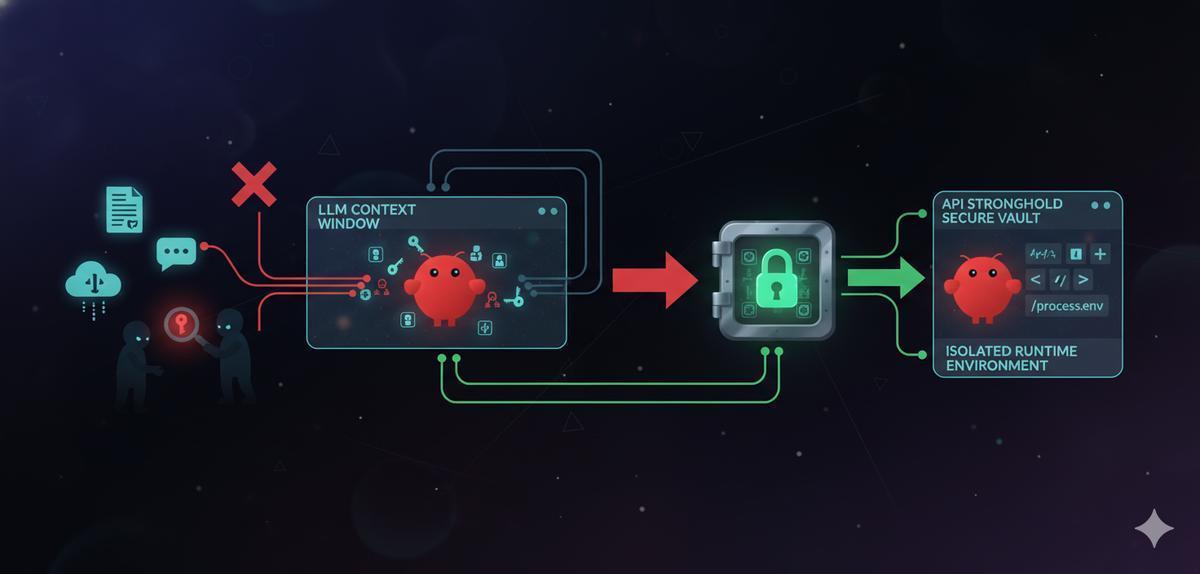
If you’re running OpenClaw with an API key in your environment, that key is inside the agent’s context window. Every prompt you send, every skill that runs, every sub-agent that spins up, your credential travels with it.
Security researchers scanning ClawHub’s roughly 4,000 public skills found that 283 of them (7%) contain code that actively exposes those credentials: passing keys through the LLM context, logging them in output files, or forwarding them to sub-agents that don’t need them. And that’s just the accidental leaks.
TL;DR
7% of OpenClaw skills expose credentials through the LLM context window and output logs. The fix: never pass API keys through the agent. Use API Stronghold to inject scoped secrets at runtime, outside the context window, so keys never touch the model.
The Research: 283 Skills Leaking Credentials
The root cause isn’t a bug in OpenClaw. Skill authors are treating AI agents like local scripts, writing SKILL.md files that instruct the agent to handle secrets directly and pass API keys through the LLM’s context window. Your secrets end up flowing through the model provider’s infrastructure because that’s how the skill was written.
Why This Matters: Three Attack Vectors
1. Credentials in the Context Window
When a skill tells the agent to “use this API key,” that key becomes part of the prompt sent to the model provider. It exists in their logs, their memory, and potentially in the model’s context for the duration of the session. Anyone with access to those logs, or any prompt injection attack, can extract the key.
2. Indirect Prompt Injection
Researchers also demonstrated how attackers can embed malicious payloads in documents the agent processes; Google Docs, Slack messages, emails. Once the agent reads a compromised document, the attacker can instruct it to exfiltrate credentials, create unauthorized integrations, or install backdoors.
If your API keys are in the agent’s context window, prompt injection gives an attacker direct access to those keys.
3. Malicious Skills
Beyond accidental leaks, researchers found 76 skills containing deliberately malicious payloads, designed for credential theft, backdoor installation, and data exfiltration. If you install one of these skills and your secrets are accessible to the agent, the attacker gets everything.
The Fix: Keep Secrets Out of the Agent
The answer isn’t to stop using AI agents. It’s to stop routing secrets through them.
API keys should never pass through the LLM context window. Full stop.
Instead of embedding keys in skill instructions or passing them to the agent directly, inject them into the runtime environment where the agent’s tools can read them, but the model never sees the values. That’s what API Stronghold’s scoped secrets do.
How Scoped Secrets Work
-
Store keys in an encrypted vault, not in
.envfiles, not in skill configurations, not anywhere the agent can read them as text. -
Create a deployment profile with only the keys the agent needs, an OpenClaw instance running home automation doesn’t need your Stripe API key. Map only the relevant keys to the deployment profile and assign it to a user group.
-
Inject at runtime, use the CLI to generate an environment file from the scoped deployment profile when the agent starts. The keys exist in process memory, not in the prompt.
# Generate .env with only the keys mapped to this deployment profile
api-stronghold-cli deployment env-file openclaw-home .env

# Start OpenClaw - keys are in env vars, not in the context window
openclaw start
Or run the agent with secrets injected directly into the process, without writing a file:
api-stronghold-cli run openclaw-home -- openclaw startSecrets are injected as environment variables into the child process only. The LLM never sees the key values. Prompt injection can’t extract what isn’t in the context.
Key Exclusion Rules
API Stronghold also supports exclusion rules, explicitly blocking sensitive keys from being pulled into an agent’s environment:
- Billing keys (Stripe, payment processors), an AI agent should never touch these
- Email credentials, prevents an agent from sending unauthorized messages
- Infrastructure keys (AWS root, database admin), limit blast radius
Even if a malicious skill tries to access these keys, they simply don’t exist in the agent’s environment.
Keep your API keys out of OpenClaw's context window
API Stronghold injects scoped credentials at runtime so your agent never holds real keys. Prompt injection extracts nothing. Free to get started, no card required.
No credit card required
Zero-Knowledge Encryption: Why It Matters Here
The credential leak problem gets worse when you think about where secrets are stored. If your secrets manager can decrypt your keys, a breach of that service takes everything with it.
With zero-knowledge encryption, secrets are encrypted before they leave your device. API Stronghold never has access to plaintext keys, not during storage, not during sync, not ever. Prompt injection, malicious skills, even a compromise of the secrets manager itself, none of that bypasses encryption that the server can’t undo.
Practical Setup: Securing OpenClaw in 5 Minutes
If you’re running OpenClaw today, here’s how to lock it down:
1. Install the CLI
macOS / Linux:
curl -fsSL https://www.apistronghold.com/cli/install.sh | shWindows (Command Prompt):
curl -fsSL https://www.apistronghold.com/cli/install.cmd -o install.cmd && install.cmd && del install.cmd2. Authenticate
For interactive use (opens your browser):
api-stronghold-cli loginFor automation (CI/CD, containers), use an API user token:
api-stronghold-cli auth api-user --token <YOUR_TOKEN>3. Create a scoped deployment profile
In the API Stronghold dashboard, create a deployment profile (e.g., openclaw-assistant) and map only the keys this agent needs. Then create a user group and assign the deployment profile to it so access is locked down.
See the CLI docs for the full command reference.
4. Generate environment file and start the agent
api-stronghold-cli deployment env-file openclaw-assistant .env
openclaw start
Or run the agent with secrets injected directly into the process, without writing a file:
api-stronghold-cli run openclaw-assistant -- openclaw startThat’s it. Your keys are injected as environment variables into the child process. The LLM context window never sees them.
For a full walkthrough with Docker isolation, see our OpenClaw Docker Quickstart.
What Skill Authors Should Do
If you’re publishing skills to ClawHub, a few things:
- Never reference API keys in SKILL.md: don’t instruct the agent to handle, display, or log credentials
- Read from environment variables: design your skill’s tools to pull keys from
process.env, not from the agent’s context - Document which keys are needed, so users can create appropriate scoped groups
- Never hardcode credentials: this should be obvious, but 283 skills say otherwise
The Bigger Picture
AI agents are becoming more capable and more embedded in development workflows. The OpenClaw credential leak findings aren’t unique to OpenClaw. Any agent that handles secrets through its context window has this problem.
The fix is the same everywhere: isolate the agent, scope the secrets to only what it needs, inject keys at runtime so they stay out of the context window, and encrypt at rest with zero-knowledge so a vault breach doesn’t mean plaintext exposure.
Get started with the CLI or see our pricing plans.
Your OpenClaw agent shouldn't hold real API keys
API Stronghold's credential proxy injects scoped, short-lived tokens at runtime. A prompt injection or leaked context window gets nothing useful.
No credit card required